BQ76952 Settings Transfer
The BQ settings represent the “direct commands”, “subcommands”, and RAM settings that can be sent to the BQ chip. The specifics of the how to send the settings are detailed in the BQ Software Development Guide.
The BQ settings are transferred to the STM via the CANopen interface. The STM then saves the BQ settings into EEPROM to be loaded and sent to the BQ chip itself on startup.
Approach to Configuring the BQ
The BQ chip has two main means of loading settings. First, the settings can be programmed into the chip’s non-violotile memory through a process called OTP (one time programming). Those settings can only be programmed in once. Below is a snippet from the BQ Technical Reference Manual.
The OTP memory in the BQ76952 device is initially all-zeros. Each bit can be left as a “0” or written to a “1,” but it cannot be written from a “1” back to a “0.” The OTP memory includes two full images of the Data Memory configuration settings. At power=up, the device will XOR each setting in the first OTP image with the corresponding setting in the second OTP image and with the default value for the corresponding setting, with the resulting value stored into the RAM register for use during operation. This allows any setting to be changed from the default value using the first image, then changed back to the default once using the second image. The OTP memory also includes a 16=bit signature, which is calculated over most of the settings and stored in OTP. When the device is powered up, it will read the OTP settings and check that the signature matches that stored, to provide robustness against bit errors in reading or corruption of the memory. If a signature error is detected, the device will boot into the default configuration (as if the OTP is cleared).
Since OTP is most reliably accomplished in a manufacturing setting, it was decided to not rely on OTP and instead send over the settings manually via I2C commands at system startup. This is a common practice and another recommend approach seen elsewhere in the TI documentation. For the BMS approach, it was decided that the BMS firmware would handle the storage of the desired settings and the programming of those settings over I2C to the BQ chip.
BQ Setting Representation
BQ Settings are made up for 7 bytes of data. Below is the break down of the data as it is represented in the byte array.
Note
CANopen stores data in little endian format, so the BQ settings mirror this to make debugging across the CANopen network easier. Settings will be read in over CANopen in little endian format, and the settings will be stored in EEPROM in little endian format. The little endian nature only impact individual values ie) The address is in little endian format.
An important concept is the “type” of command. The BQ has three main areas that can be configured. First are direct commands. Direct commands are I2C write directly to specific registers. Subcommands are indirectly written by writting the address into two registers. RAM operates in the same manner. Both subcommands and RAM support up to 4 bytes of data which are written out across 4 byte sized registers.
Below is a breakdown of how the important components are encoded into a byte array. Each setting is represented in the form below and an array of settings are kept for the BQ.
Byte |
Description |
0 |
Command Byte, stores the command type and the number of data bytes
Bits 0-1: Command Type
00: Direct
01: Subcommand
10: RAM
11: Unused
Bits 2-4: Number of bytes of data (0-4)
|
1 |
LSB of the target address of the command, for direct commands, only this byte will be used |
2 |
MBS of the target address of the command, for subcommand and RAM access. |
3-6 |
Up to 4 bytes of data |
For example, a command targetting RAM, with 4 bytes of data, intended for address 0x0102 with data 0x05060708 would be encoded as follows.
0x04020108070605
Note the little endian nature of how the address and data was encoded.
The encoded format that is shown above is how the data is formatted when it is sent over CANopen and stored into EEPROM. Therefore, the same logic can be used to decode BQ settings that are sent over CANopen or read from EEPROM. Both for saving in EEPROM and sending over CANopen, each setting will be stored “back-to-back” as binary data.
Updating the Settings
The settings are stored in EEPROM and updating the settings takes place over CANopen. Below is the sequence diagrams of the actions.
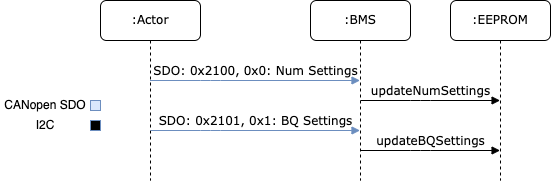
The “Actor” in the sequence diagram is any system setup for sending the settings over CANopen. This could be anything from the GUB, Vector CAN, etc. The Actor starts by sending over the number of settings via an SDO request to index 0x2100 and subindex 0x0. This transfer is an expedited SDO request with a 2 byte value. The BMS will then save the new number of settings into EEPROM.
Next, the Actor sends over the BQ settings via a segmented SDO request to index 0x2100 and subindex 0x1. The settings will be formated following the convention above, the Actor will continue sending the bytes making up the array of settings until all settings have been transferred. As the settings are received, the BMS will store the results into EEPROM.
For instructions on how to transfer the settings, refer to this documentation.